How to Self-Host Immich with Docker Compose
Quick Summary
| Spec | Details |
|---|---|
| Replaces | Google Photos, iCloud Photos, Amazon Photos |
| RAM | 4 GB minimum, 8 GB recommended |
| Storage | 20 GB application + your full photo library |
| Mobile Apps | iOS and Android (auto-upload, background sync) |
| AI Features | Face recognition, smart search, object detection |
| Docker Image | ghcr.io/immich-app/immich-server:v2.6.1 |
| Web UI Port | 2283 |
| License | AGPL-3.0 (free, open source) |
| GitHub Stars | 90,000+ |
What Is Immich?
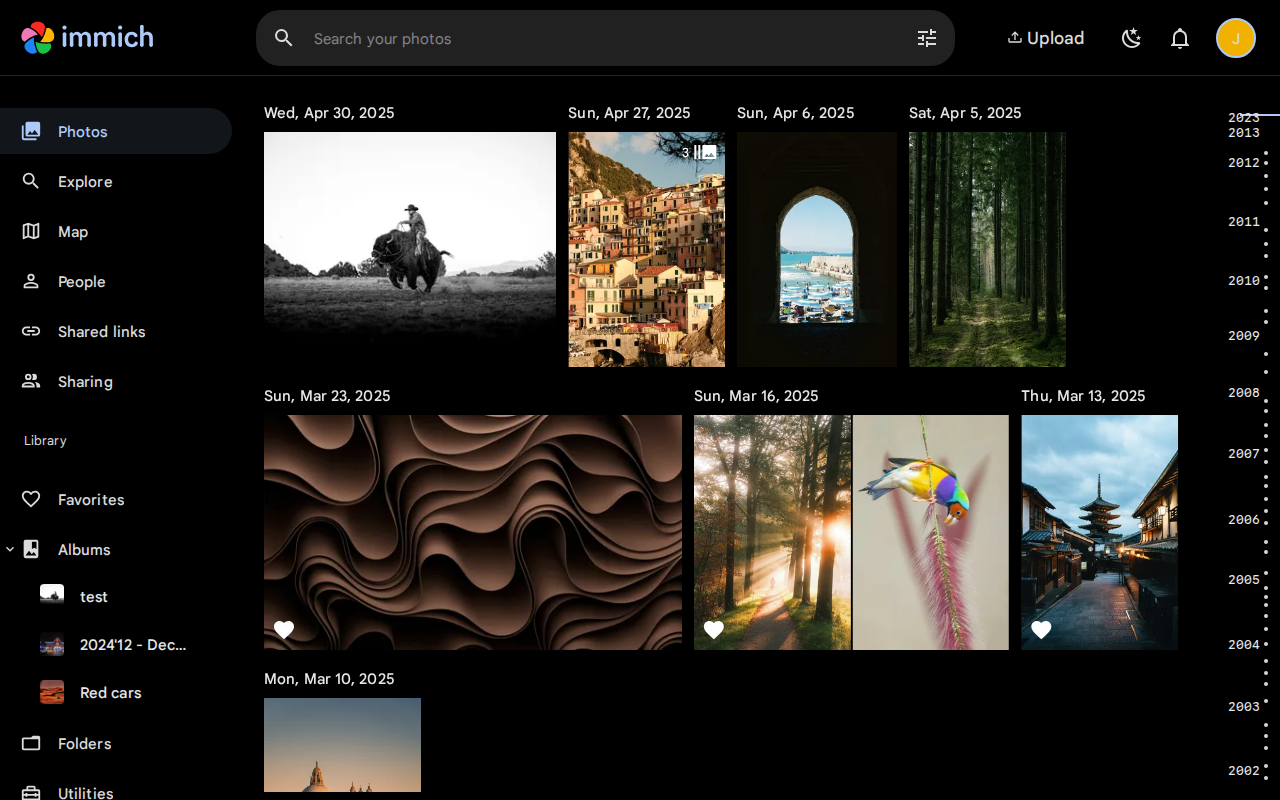
Immich is a self-hosted photo and video management platform built as a direct alternative to Google Photos. It provides AI-powered facial recognition, CLIP-based smart search, object detection, automatic background uploading from mobile devices, and a polished web interface for browsing your library. It is one of the fastest-growing self-hosted projects on GitHub (90,000+ stars) and ships native iOS and Android apps that feel remarkably close to what Google Photos offers.
Self-hosting Immich means your photos never leave your server. No scanning, no training data harvesting, no storage limits beyond your own hardware. You get the smart features — face grouping, search by description (“dog on beach”), map view — without handing your personal media to a third party.
Important: Immich is under very active development. The API and configuration may change between versions. Always pin your version tag and read the release notes before upgrading.
Prerequisites
- A Linux server (Ubuntu 22.04+ recommended)
- Docker Engine v25+ and Docker Compose v2 installed (guide)
- 4 GB RAM minimum (8 GB recommended for machine learning features)
- 20 GB free disk space for the application, plus unlimited storage for your photo library
- A domain name (recommended for remote access and mobile app connectivity)
Docker Compose Configuration
Immich runs as four services: the main server (API + web UI), a machine learning service (face recognition, smart search), PostgreSQL with vector extensions (database), and Valkey (Redis-compatible cache).
Create a project directory:
mkdir -p /opt/immich && cd /opt/immichCreate a .env file with your configuration:
# /opt/immich/.env

# Path where uploaded photos and videos are stored on the host.
# Use an absolute path. This directory will grow as you upload media.
UPLOAD_LOCATION=/opt/immich/library

# Path where the PostgreSQL database files are stored on the host.
# IMPORTANT: Do NOT use a network share (NFS/SMB) for this — it will corrupt the database.
DB_DATA_LOCATION=/opt/immich/postgres

# Timezone — affects how timestamps are displayed.
# Full list: https://en.wikipedia.org/wiki/List_of_tz_database_time_zones
TZ=Etc/UTC

# Pin to a specific Immich release. Never use "release" or "latest" in production.
IMMICH_VERSION=v2.6.1

# PostgreSQL credentials. Change DB_PASSWORD to a strong random value.
# Use only alphanumeric characters (A-Za-z0-9) to avoid shell escaping issues.
DB_PASSWORD=CHANGE_ME_TO_A_RANDOM_STRING
DB_USERNAME=postgres
DB_DATABASE_NAME=immich
Create the docker-compose.yml:
# /opt/immich/docker-compose.yml
name: immich

services:
  immich-server:
    container_name: immich_server
    image: ghcr.io/immich-app/immich-server:${IMMICH_VERSION}
    volumes:
      # Main upload/library storage
      - ${UPLOAD_LOCATION}:/data
      # Sync container time with the host
      - /etc/localtime:/etc/localtime:ro
    env_file:
      - .env
    ports:
      - "2283:2283"
    depends_on:
      redis:
        condition: service_healthy
      database:
        condition: service_healthy
    restart: unless-stopped
    healthcheck:
      disable: false

  immich-machine-learning:
    container_name: immich_machine_learning
    image: ghcr.io/immich-app/immich-machine-learning:${IMMICH_VERSION}
    volumes:
      # Cache for downloaded ML models (~2-4 GB). Named volume persists across restarts.
      - model-cache:/cache
    env_file:
      - .env
    restart: unless-stopped
    healthcheck:
      disable: false

  redis:
    container_name: immich_redis
    image: docker.io/valkey/valkey:8-bookworm
    healthcheck:
      test: valkey-cli ping || exit 1
      interval: 10s
      timeout: 5s
      retries: 5
    restart: unless-stopped

  database:
    container_name: immich_postgres
    image: ghcr.io/immich-app/postgres:14-vectorchord0.4.3-pgvectors0.2.0
    environment:
      POSTGRES_PASSWORD: ${DB_PASSWORD}
      POSTGRES_USER: ${DB_USERNAME}
      POSTGRES_DB: ${DB_DATABASE_NAME}
      POSTGRES_INITDB_ARGS: "--data-checksums"
    volumes:
      # Database storage — use a local SSD, never a network share.
      - ${DB_DATA_LOCATION}:/var/lib/postgresql/data
    restart: unless-stopped
    healthcheck:
      disable: false

volumes:
  model-cache:
Create the upload directory and start the stack:
mkdir -p /opt/immich/library /opt/immich/postgres
docker compose up -d
Verify all four containers are running and healthy:
docker compose psYou should see immich_server, immich_machine_learning, immich_redis, and immich_postgres all with status Up (healthy).
Why These Images?
ghcr.io/immich-app/immich-server— the unified server that handles the API, web UI, and background jobs (microservices) in a single container. Older Immich versions split these into separate containers, but v2.x consolidates them.ghcr.io/immich-app/immich-machine-learning— runs the ML models for facial recognition, CLIP-based smart search, and object detection. It communicates with the server over the internal Docker network.ghcr.io/immich-app/postgres:14-vectorchord0.4.3-pgvectors0.2.0— a custom PostgreSQL 14 image with vector search extensions (VectorChord and pgvecto.rs) pre-installed. Immich uses these for CLIP embedding storage and similarity search. Do not substitute a generic PostgreSQL image.docker.io/valkey/valkey— Valkey is a Redis-compatible in-memory cache. Immich uses it for job queuing, session management, and caching.
Initial Setup
- Open
http://YOUR_SERVER_IP:2283in a browser. - Click Getting Started to create your admin account. Choose a strong password — this is the only account with full admin access.
- After logging in, you land on the main photo timeline (empty for now).
- Navigate to Administration (gear icon in the sidebar) to configure server settings.
Key settings to configure immediately:
- Storage Template (Administration > Storage Template): Customize how uploaded files are organized on disk. The default stores files by upload date. A common pattern:
{{y}}/{{y}}-{{MM}}-{{dd}}/{{filename}}organizes photos by year and date. - Machine Learning (Administration > Machine Learning): Enabled by default. Face detection and CLIP search start processing as soon as you upload photos.
- Map (Administration > Map Settings): Enable the map view by accepting the terms for map tile usage.
Configuration
Storage and Library Management
Immich stores uploaded media in the path mounted at /data inside the container (your UPLOAD_LOCATION on the host). By default, files are organized by user ID and upload date.
To customize file organization, go to Administration > Storage Template and define a template using variables like {{y}} (year), {{MM}} (month), {{dd}} (day), and {{filename}}.
To import an existing photo library without re-uploading, use External Libraries. Go to Administration > External Libraries, add a new library, and point it to a path accessible inside the container. You need to add an additional volume mount in docker-compose.yml:
immich-server:
  volumes:
    - ${UPLOAD_LOCATION}:/data
    - /etc/localtime:/etc/localtime:ro
    - /mnt/photos/existing-library:/mnt/existing-library:ro  # Read-only external library
The :ro flag ensures Immich can read but not modify your existing files.
Machine Learning Features
Immich runs three ML models by default:
- CLIP — enables smart search. You can search for photos by typing natural language descriptions like “sunset at the beach” or “birthday cake.”
- Facial Recognition — detects and groups faces across your library. You can name people and search by name.
- Object Detection — tags photos with detected objects automatically.
All models download on first use and are cached in the model-cache volume (~2-4 GB total). Initial processing of a large library takes significant CPU/RAM — expect high resource usage for hours or days depending on library size.
To tune ML performance, set these optional environment variables in .env:
# Number of ML worker processes (default: 1). Increase on multi-core systems.
MACHINE_LEARNING_WORKERS=1

# Seconds before idle models are unloaded from memory (default: 300).
MACHINE_LEARNING_MODEL_TTL=300
Mobile App Setup
- Install the Immich app from the App Store (iOS) or Google Play (Android).
- Enter your server URL:
http://YOUR_SERVER_IP:2283(or your domain with HTTPS if behind a reverse proxy). - Log in with your credentials.
- Enable Auto Backup in the app settings. This uploads new photos and videos automatically when connected to WiFi (configurable).
- Optionally enable Background Backup for uploads even when the app is not open. On iOS, this requires location permissions (to trigger background activity).
HTTPS is required for mobile auto-upload if your server is not on the same local network. Set up a reverse proxy with SSL before configuring the mobile app for remote access.
Users and Sharing
- Create users: Administration > User Management. Each user gets isolated storage and their own ML-processed library.
- Shared Albums: Any user can create shared albums and invite other users. Shared album members can view, download, and optionally upload.
- Partner Sharing: Under Account Settings > Partner Sharing, users can grant full access to their library to another user (useful for families).
Maps and Metadata
Enable map view under Administration > Map Settings. Immich reads GPS coordinates from photo EXIF data and plots them on a map. You can browse photos by location.
EXIF metadata (camera model, lens, exposure settings, GPS coordinates) is extracted and displayed automatically. Immich preserves original EXIF data and never modifies your source files.
Advanced Configuration
Hardware Acceleration
Immich supports GPU acceleration for both video transcoding and machine learning inference. This dramatically reduces CPU usage and speeds up processing.
NVIDIA GPU (Transcoding)
Add device access to the immich-server service:
immich-server:
  # ... existing config ...
  devices:
    - /dev/nvidia0:/dev/nvidia0
    - /dev/nvidiactl:/dev/nvidiactl
    - /dev/nvidia-uvm:/dev/nvidia-uvm
  deploy:
    resources:
      reservations:
        devices:
          - driver: nvidia
            count: 1
            capabilities:
              - gpu
              - video
Requirements: NVIDIA driver and NVIDIA Container Toolkit installed on the host.
After redeploying, enable NVENC in Administration > Video Transcoding Settings.
Intel Quick Sync / VAAPI (Transcoding)
Add the DRI device to the immich-server service:
immich-server:
  # ... existing config ...
  devices:
    - /dev/dri:/dev/dri
After redeploying, enable VAAPI or Quick Sync in Administration > Video Transcoding Settings.
NVIDIA CUDA (Machine Learning)
Switch the ML image to the CUDA variant and add GPU access:
immich-machine-learning:
  container_name: immich_machine_learning
  image: ghcr.io/immich-app/immich-machine-learning:${IMMICH_VERSION}-cuda
  volumes:
    - model-cache:/cache
  env_file:
    - .env
  restart: unless-stopped
  deploy:
    resources:
      reservations:
        devices:
          - driver: nvidia
            count: 1
            capabilities:
              - gpu
Intel OpenVINO (Machine Learning)
Switch the ML image to the OpenVINO variant:
immich-machine-learning:
  container_name: immich_machine_learning
  image: ghcr.io/immich-app/immich-machine-learning:${IMMICH_VERSION}-openvino
  volumes:
    - model-cache:/cache
  env_file:
    - .env
  restart: unless-stopped
  devices:
    - /dev/dri:/dev/dri
External Libraries
External libraries let Immich index existing photo directories without moving or copying files. Useful when you have terabytes of photos already organized on a NAS.
- Add the directory as a read-only volume mount on
immich-server(shown in the Storage section above). - In Administration > External Libraries, create a new library and set the import path to the container mount point (e.g.,
/mnt/existing-library). - Immich indexes the files, generates thumbnails, and runs ML processing — but never modifies the originals.
OAuth / SSO
Immich supports OAuth 2.0 / OpenID Connect. Under Administration > OAuth Settings, configure:
- Issuer URL — your identity provider’s discovery URL (e.g., Authentik, Authelia, Keycloak)
- Client ID and Client Secret — from your OAuth application
- Scope — typically
openid email profile
This lets users log in with your existing SSO provider instead of Immich-managed credentials.
Reverse Proxy
Immich handles large file uploads (photos and especially videos), so you must increase the maximum allowed body size in your reverse proxy.
Nginx Proxy Manager
In the advanced tab of your proxy host, add:
client_max_body_size 50000M;
proxy_read_timeout 600s;
proxy_send_timeout 600s;
Caddy
immich.yourdomain.com {
    reverse_proxy localhost:2283 {
        header_up X-Real-IP {remote_host}
    }
    request_body {
        max_size 50GB
    }
}
For full reverse proxy configuration details, see the Reverse Proxy Setup guide.
Backup
Immich stores data in two places, and both must be backed up:
1. Upload Directory
Your UPLOAD_LOCATION contains all original photos and videos. Back this up with your preferred tool (rsync, restic, borgmatic). This is the most critical data.
# Example: rsync to a remote backup server
rsync -avz --progress /opt/immich/library/ user@backup-server:/backups/immich/library/
2. PostgreSQL Database
The database stores user accounts, album structures, facial recognition data, search embeddings, and all metadata. Do not rely on volume-level snapshots — use pg_dump for a consistent backup.
# Dump the database to a SQL file
docker exec immich_postgres pg_dump -U postgres -d immich > /opt/immich/backups/immich-db-$(date +%Y%m%d).sql
Automate this with a cron job:
# /etc/cron.d/immich-backup
0 3 * * * root docker exec immich_postgres pg_dump -U postgres -d immich | gzip > /opt/immich/backups/immich-db-$(date +\%Y\%m\%d).sql.gz
Restore from backup:
# Stop immich-server first to prevent writes
docker compose stop immich-server immich-machine-learning

# Restore the database
cat /opt/immich/backups/immich-db-20260216.sql | docker exec -i immich_postgres psql -U postgres -d immich

# Restart services
docker compose up -d
For a comprehensive backup strategy, see the Backup Strategy guide.
Troubleshooting
Photos Not Uploading from Mobile
Symptom: The mobile app connects but uploads stall or fail silently.
Fix: The most common cause is an HTTP connection without SSL. Mobile operating systems (especially iOS) block or throttle background uploads over unencrypted connections. Set up HTTPS through a reverse proxy. Also verify the server URL in the app settings includes the correct port (:2283 if not proxied) and that your firewall allows traffic on that port.
Machine Learning High CPU Usage
Symptom: CPU pegs at 100% for extended periods after uploading photos.
Fix: This is expected behavior during initial library processing. The ML service processes every photo for face detection, object recognition, and CLIP embeddings. A library of 50,000 photos can take 12-24 hours on a 4-core CPU. After initial processing, the ML service settles to near-zero CPU usage and only activates when new photos are uploaded. If you need to reduce impact during processing, lower the worker count:
# In .env
MACHINE_LEARNING_WORKERS=1
Face Recognition Not Working
Symptom: No faces detected after uploading photos.
Fix: Check that the immich_machine_learning container is running and healthy. ML models download on first use (~1-2 GB), so face detection does not start until the download completes. Check the ML container logs:
docker logs immich_machine_learningLook for model download progress or errors. If the container is crashing due to OOM, increase the system memory or reduce MACHINE_LEARNING_WORKERS to 1.
Database Errors After Update
Symptom: Immich fails to start after a version upgrade with database migration errors.
Fix: Always read the release notes before updating. Some releases include breaking database migrations. Back up the database before any upgrade:
docker exec immich_postgres pg_dump -U postgres -d immich > /opt/immich/backups/pre-upgrade-$(date +%Y%m%d).sqlIf the migration fails, restore from backup, stay on the previous version, and check the Immich GitHub discussions for known issues with that migration.
Out of Disk Space
Symptom: Uploads fail or the server crashes with disk-related errors.
Fix: Check disk usage in your upload location and database directory:
du -sh /opt/immich/library
du -sh /opt/immich/postgres
Immich generates thumbnails and encoded video versions in addition to storing originals. A 1 TB photo library may consume 1.3-1.5 TB total including thumbnails and transcoded previews. Monitor disk usage and expand storage before hitting capacity. You can move UPLOAD_LOCATION to a larger drive by updating the .env path and moving the data.
Resource Requirements
- RAM: ~2 GB idle (server + ML containers), 4-8 GB during active ML processing. 8 GB recommended for libraries over 50,000 photos.
- CPU: Low when idle. Medium-High during ML processing (face detection, CLIP embedding generation). A 4-core CPU handles ongoing uploads fine; initial bulk processing benefits from more cores.
- Disk: ~20 GB for the application, database, and ML model cache. Photo storage is unlimited and depends entirely on your library size.
- GPU: Optional but recommended. An NVIDIA or Intel GPU significantly speeds up video transcoding and ML inference. Not required for basic functionality.
Verdict
Immich is the best self-hosted Google Photos replacement available today. The mobile app experience is remarkably close to what Google Photos offers — auto-upload works reliably, the timeline view is smooth, and sharing albums with family members is straightforward. The AI features (face recognition, smart search by natural language, object tagging) actually work well and improve as the ML models process your library.
The main caveats: Immich needs more RAM than most self-hosted apps (4 GB minimum with ML enabled, 8 GB recommended), and it is still under rapid development — expect breaking changes between major versions. Do not use Immich as your only copy of photos. Maintain a proper backup of your originals independent of Immich.
With proper backups in place, Immich is the clear winner in the photo management category. Nothing else in the self-hosted space matches its combination of AI features, mobile app quality, and development velocity. If you are paying for Google Photos storage or want to reclaim control of your photo library, start here.
Frequently Asked Questions
Is Immich stable enough for daily use?
Yes. Since the v2.0 stable release, Immich is production-ready for personal photo management. The mobile apps handle auto-upload reliably, the web UI is polished, and data loss bugs are extremely rare. The “active development” warning mostly means the admin interface and API may change between versions — your photos and database are safe. Pin your version tag, back up your database before upgrading, and read the release notes. Thousands of users run Immich as their primary photo manager.
How much storage does Immich need?
The application itself (containers, database, ML model cache) uses about 20 GB. Beyond that, storage depends entirely on your photo library. A rough estimate: 5 MB per photo average means 50 GB for 10,000 photos, 500 GB for 100,000 photos. Immich also generates thumbnails and video transcodes, which add roughly 30-50% overhead on top of your original files. A 1 TB library typically needs 1.3-1.5 TB total disk space. Use a local SSD for the database and a larger HDD or NAS mount for the upload library.
Can Immich replace Google Photos?
For most users, yes. Immich covers the core Google Photos experience: automatic mobile upload, timeline browsing, face recognition, smart search by description (“dog on beach”), albums, sharing, and a map view. The mobile apps feel close to Google Photos in daily use. What you gain: no storage limits, no privacy concerns, no subscription fees. What you lose: Google’s unlimited free tier is gone (they charge for storage now anyway), and Google Lens integration is not available. For families, Immich’s partner sharing and shared albums work well. The migration path is straightforward — use Google Takeout to export, then upload via the Immich CLI or mobile app.
Does Immich support face recognition?
Yes, face recognition is built in and enabled by default. Immich downloads ML models on first startup (~1-2 GB) and automatically detects faces in every uploaded photo. You can name recognized people under Explore > People in the web UI, then search your library by person name. Face grouping improves over time as you merge duplicates and confirm identities. Processing a large library (50,000+ photos) takes 12-24 hours on a 4-core CPU, but runs in the background without blocking uploads. GPU acceleration (NVIDIA CUDA or Intel OpenVINO) speeds this up significantly.
How do I migrate from Google Photos to Immich?
Use Google Takeout to export your entire Google Photos library. Select only Google Photos, choose .zip format, and download all archives. Extract the zip files — you will get folders organized by album or date. Then upload to Immich using one of three methods: (1) Immich CLI (immich upload --recursive /path/to/takeout/) — fastest for large libraries, preserves EXIF dates. (2) Mobile app — select photos from your device gallery and upload. (3) External library — mount the extracted directory as a read-only volume and import via Administration > External Libraries. The CLI method is recommended for bulk migration because it handles metadata correctly and runs faster than the mobile app for large batches.
Related
- Install Immich on Ubuntu Server
- Install Immich on Raspberry Pi
- Install Immich on Proxmox VE
- Best Self-Hosted Photo Management
- Immich vs PhotoPrism
- Immich vs LibrePhotos
- Immich vs iCloud Photos
- Immich vs Lychee
- Immich vs PhotoView
- Immich vs Piwigo
- PhotoPrism vs Immich vs LibrePhotos
- Replace Google Photos
- Replace iCloud Photos
- Replace Amazon Photos
- Docker Compose Basics
- Docker Volumes
- Reverse Proxy Setup
- Backup Strategy
- Immich vs Google Photos
Get self-hosting tips in your inbox
Get the Docker Compose configs, hardware picks, and setup shortcuts we don't put in articles. Weekly. No spam.
Comments